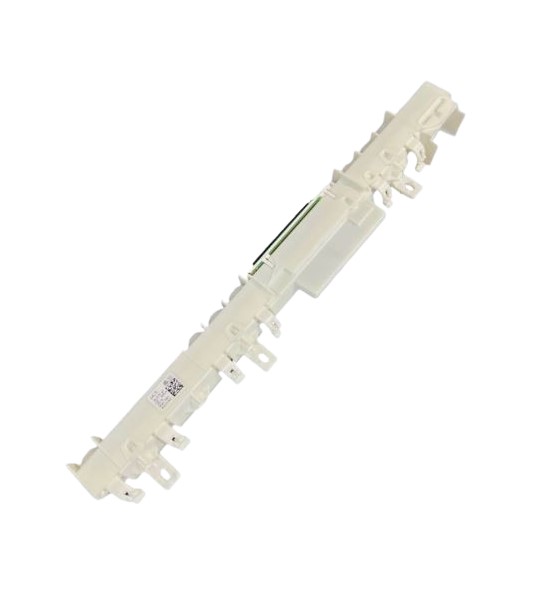
The top display digits are bright again, making cycle monitoring very easy.
★
★
★
★
★
Smooth Operation
Kimberly
—
No flickering or dim display after setup.
★
★
★
★
★
Works Seamlessly
James
—
Interface board fixed error code lock-out on my Asko.
★
★
★
★
★
Quick Setup
Mariska
—
Cycle status now shows accurately throughout operation.
★
★
★
★
★
Responds Accurately
Thomas
—
Replaced the interface board and now all cycle lights respond correctly.
Fast & ReliableSame Day ShippingOrder by 2PM CST, ships today!
Your Data Is SafeSecure Payment100% secure checkout
We're Here For YouBest Customer ServiceReal people, real support
Shop With ConfidenceEasy Returns30 days, hassle-free returns
join the Loyalty program
We collect user information to provide a better user experience and protect the security of our website. By continuing to use our website, you acknowledge the use of cookies.
A cookie is information stored on your computer by a website you visit. Cookies provide a way for the site to recognize you and keep track of your preferences. Ecommerce websites place cookies on visitors' browsers to retain login credentials, identify customers, and provide a customized shopping experience.
We respect the privacy of individuals and recognize the importance of personal data entrusted to us by our customers. Any website visitor may choose not to allow some types of cookies. Click on cookie category headings and cookie details to find out more and change our default settings. However, blocking some types of cookies may impact your website experience and prevent you from using all the features on our store.
Strictly necessary cookies
Always Active
These cookies are essential for you to browse our store and use its features, such as accessing secure areas of the website. Cookies that allow holding your cart items, cookies that keep you logged-in and cookies that save your customized preferences are an example of strictly necessary cookies. These cookies are essential to a website's functionality and cannot be disabled by users.
First party
Name
dwsid
Domain
staging.hnkparts.com
Duration
Session
Type
1st Party
Category
Strictly necessary cookies
Description
Identifies your session so the store can keep your cart and sign-in state across pages.
Name
dwsecuretoken_*
Domain
staging.hnkparts.com
Duration
Session
Type
1st Party
Category
Strictly necessary cookies
Description
Secures your session over HTTPS and protects your account against session hijacking.
Name
dwanonymous_*
Domain
staging.hnkparts.com
Duration
6 months
Type
1st Party
Category
Strictly necessary cookies
Description
Identifies you as a guest shopper so your basket survives between visits before you sign in.
Name
cookieConsent
Domain
staging.hnkparts.com
Duration
365 days
Type
1st Party
Category
Strictly necessary cookies
Description
Stores the cookie categories you have agreed to, so we do not ask you again.
Preferences cookies
Preferences cookies are also known as "functionality cookies". These cookies allow a website to remember choices you have made in the past, like what language you prefer, your favourite search filters, or what your user name and password are so you can automatically log in.
First party
Name
dw_cookies_accepted
Domain
staging.hnkparts.com
Duration
365 days
Type
1st Party
Category
Preferences cookies
Description
Remembers that you dismissed the cookie notice.
Statistics cookies
Statistics cookies are also known as "performance cookies". These cookies collect information about how you use a website, like which pages you visited and which links you clicked on. None of this information can be used to identify you. It is all aggregated and, therefore, anonymized. Their sole purpose is to improve website functions. This includes cookies from third-party analytics services, such as visitor analytics, heatmaps and social media analytics.
First party
Name
_ga
Domain
staging.hnkparts.com
Duration
2 years
Type
3rd Party
Category
Statistics cookies
Description
Google Analytics: distinguishes one visitor from another so visits can be counted.
Name
_ga_*
Domain
staging.hnkparts.com
Duration
2 years
Type
3rd Party
Category
Statistics cookies
Description
Google Analytics: keeps the state of your session for this property.
Name
_gid
Domain
staging.hnkparts.com
Duration
24 hours
Type
3rd Party
Category
Statistics cookies
Description
Google Analytics: distinguishes one visitor from another for 24 hours.
Marketing cookies
These cookies track your online activity to help advertisers deliver more relevant advertising or to limit how many times you see an ad. These cookies can share that information with other organizations or advertisers. These are persistent cookies and almost always of third-party provenance.
First party
Name
_gcl_au
Domain
staging.hnkparts.com
Duration
3 months
Type
3rd Party
Category
Marketing cookies
Description
Google Ads: records ad clicks so a purchase can be attributed to the advert you came from.
Name
_fbp
Domain
staging.hnkparts.com
Duration
3 months
Type
3rd Party
Category
Marketing cookies
Description
Meta Pixel: records ad clicks so a purchase can be attributed to the advert you came from.